Releases 2.11.9.2 & 2.10.23.2
📦Main Features
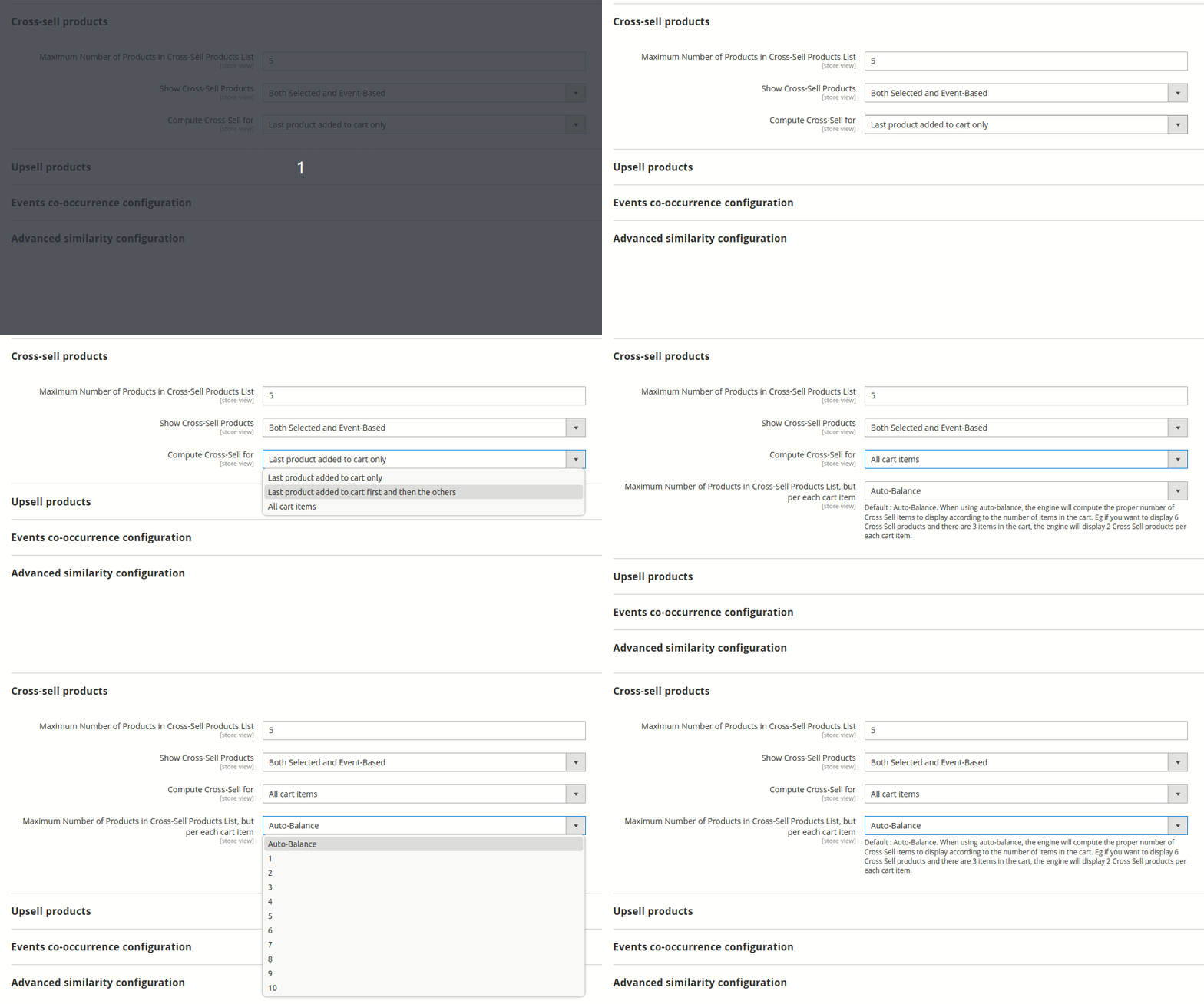
Allowing to extend cross sell recommendations to all products in the cart
Up to now, the Elasticsuite cross-sell recommendation block only showed recommendations for the last product added to the cart. It is now possible to show recommendations for all the products in the cart :
- either still prioritizing the last product added to the cart but, if there are slots left, filling the block with recommendations from the other products in the cart
- or out right reserving, statically or dynamically, slots for every products in the cart
🚀 Performances oriented features
Ability to enable/disable the error requests body logging
Last release introduced an error logging mechanism that would systematically log into Magento logging system the error message and the body of requests failing on your OpenSearch/Elasticsearch server when the Elasticsuite debug mode was disabled to help with issues in production environment.
That was probably an oversight not to add a configuration switch since some type of errors can be caused by “request is too big” causes, hence adding strain to the logging system by pushing several megabytes requests bodies.
A new setting “Enable logging of request that produce errors” is available in Stores > Configuration > Elasticsuite > Base Settings just above the legacy “Enable Debug Mode” :

Thesaurus: ability to limit the amount of alternative queries effectively sent to the search engine
While the Thesaurus system “Max Allowed Rewrites” setting available in Elasticsuite > Search Relevance > Thesaurus Configuration > General Configuration limits the number of substitutions in the original visitor search query, there can be situations when you have a lot (and we mean a lot) of thesaurus rules with long lists of alternative terms or when the same word is present in multiple rules.
In those situations, the “Max Allowed Rewrites” will not be enough to prevent generating several tenths or even hundreds of alternative search queries leading do a huge single search request that will end up failing on the server by hitting the ceiling of the “maximum number of clauses” allowed by your cluster configuration and/or memory available.
The new setting “Max Alternative Search Queries” available in Elasticsuite > Search Relevance > Thesaurus Configuration > General Configuration allows you to put a cap on the total number of alternative, rewritten search queries to effectively take into account for a given original visitor search query (defaults to 0, no limitation).
Since there is no unified mechanism available in Elasticsearch or OpenSearch for us to detect the ideal value to put there from a technical stand point, it will be up to you to determine the value you deem “sufficient” functionally.
You can also use that setting preventively in periods of high traffic (holiday season, sale events) to limit the strain on your cluster if you know that your merchandisers have been “thesaurus happy”.
📦 Features
- [Core] Error request body logging tied to new setting
- [Core] Adding i18n placeholders for nl_NL and de_DE (new setting)
- [Thesaurus] Ability to cut-off the amount of alternative queries
- 💎[Explain] Display thesaurus alternative queries cut-off
- 💎[Recommender] Allow to extend cross sell recommendations with configuration
- 💎[Recommender] Re-organizing system.xml section with groups
- [Tracker] Prevent tracker to open sessions when registering events.
🐛 Fixes
- 💎 [BehavioralData] Handle search.max_buckets set to -1 (ES 6.8)
- 💎 [Explain] Removing last trace of ‘type’ in optimizers index
- 💎[Merchandiser] Prevent fatal error on Widgets/Hyva widgets config
- [VirtualCategories][PageBuilder] Ensure proper order for plugin appliance.