Releases 2.11.5 à 2.11.5.2 & 2.10.19 à 2.10.19.2
Elasticsuite Premium
Sort Pagebuilder Products widgets by behavioral data metrics
It is now possible to sort products according to behavioral data metrics in Products PageBuilder widgets.
Ability to disable indexing behavioral data into products per store (2.10.19.1 and 2.11.5.1)
A new master switch setting is available to disable the collection of behavioral data when reindexing products in “Stores > Configuration > Elasticsuite > Behavioral data“.
This new setting “Enabled” (set to Yes by default) allows you to disable for a given store, if need be, the collection of behavioral data relative to products (number of views, sales, conversion rate) when reindexing them.
This can be useful if you know your Elasticsuite tracker has an issue on a specific store/theme so much that it causes issues when doing a full reindex.Aliquet vulputate tellus ullamcorper morbi tristique. At mauris dui vitae cras egestas tincidunt leo pharetra. Consectetur sagittis magna porttitor gravida. Risus tincidunt congue turpis sed. Id tempus ultrices scelerisque elit cras eu. Mattis sit mattis nibh ullamcorper viverra at tortor nulla porttitor.
Elasticsuite Open Source
Additional KPIs in Analytics > Search Usage
KPIs about category views, product views, products added to cart and sales event are now extracted from your behavioral data and visible in the “Analytics > Search Usage dashboard“.
Removal of the hardcoded ‘sku’ field from exact queries filtering part
Historically, when filtering (not scoring !) results, exact match queries always targeted at least the search collector field (containing all searchable attributes content) and the sku field, whatever search weight was assigned to the sku field.
As
on one hand, we have introduced back in releases 2.10.17 and 2.11.3 (experimental) settings to specifically target in that filtering query part all fields using the reference search analyzer (used by the sku attribute by default)
- on one hand, we have introduced back in releases 2.10.17 and 2.11.3 (experimental) settings to specifically target in that filtering query part all fields using the
referencesearch analyzer (used by theskuattribute by default) - on the other hand, you might be in a situation where you do not want at all the
skuto be searchable
we have decided to remove that hardcoded sku in exact queries filtering part.
Long story short, if your users frequently perform searches by SKU and you’re still using the reference analyzer for that attribute, we urge you to go enable the following Search Relevance settings listed below :
- Elasticsuite > Search Relevance > Spellchecking Configuration > Term Vectors Configuration > Use all tokens from term vectors
- Elasticsuite > Search Relevance > Spellchecking Configuration > Term Vectors Configuration > Use reference analyzer in term vectors
- Elasticsuite > Search Relevance > Relevance Configuration > Exact matching configuration > Use default analyzer in exact matching filter query
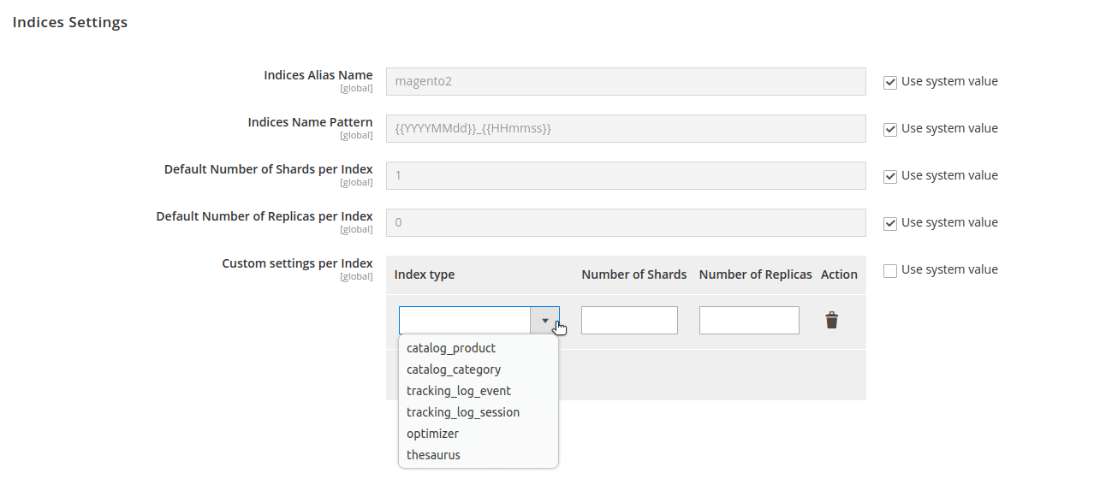
Ability to set custom number of primary shards and replicas by index type
If you’re using a 3 nodes cluster in your production environment, you could have been tempted to set 3 primary shards and 2 replicas in the legacy Elasticsuite base settings.
While it is our opinion that having multiple primary shards is hardly necessary unless you really have a sizeable product index, it is now possible to go this route while keeping usually light indices (categories, thesaurus, and tracker indices on low traffic sites) with a single primary shard.
It is now possible to definer per index type the number of primary shards and replicas of indices.
Admin notifications about invalid tracker events and automated removal
Releases 2.10.18.3 and 2.11.4.3 introduced some protections to avoid indexing invalid tracker events missing unique visitor or session ids into the behavioral data indices (as well as CLI tools to remove those already indexed).
Those invalid tracker events were left in the Elasticsuite tracker DB table with a flag is_invalid = 1.
This release introduces a cronjob task that will automatically and periodically remove them and a notification system to warn you about their existence (if you want to investigate the potential issue in your tracker tags).

You also have the ability to remove all of them at once.Switching to the OpenSearch PHP client (2.11.5)
Due to breaking changes in the Elasticsearch PHP client on one side and our comitment for the 2.11.x releases to be still compatible with Elasticsearch 7 and Elasticsearch 8 as well as to ensure our compatibility with a growing installation base of Magentos using OpenSearch on the other side, we’ve decided to switch to the OpenSearch PHP client which addresses all flavours (ES 7, ES 8, OS 1, OS 2) seamlessly.
Changes to the way the elision/contraction is managed in fulltext search (2.10.19.1 and 2.11.5.1)
We fixed the elision/contraction management for French, Italian and Catalan when indexing/searching content.
Historically the text analyzers for those languages were supposed to ignore the elision/contraction of some articles or pronouns but didn’t due to an improper order of text transformation components.
This could be problematic if you had a Minimum Should Match lower than 100%
For instance :
- in French:
l'avion(mandatory form of “le avion” – “the plane”) was supposed to be indexed asavion(plane) but was still indexed asl avion, so searching forl'avion bleu volecould matchl'écureuil bleu volewith a 75% minimum should match (matches onl,bleuandvole) - in Italian:
comedia dell'artewas supposed to be indexed ascomedia artebut was indexed ascomedia dell arte - in Catalan:
l'avi(the grandfather) was supposed to be indexed asavi(grandfather) but was indexed asl avi
This release fixes that issues and now the following elisions/contractions will be removed as intended :
- for French:
l, m, t, qu, n, s, j, d, cas defined in that language specific elision filter configuration - for Italian:
c, l, all, dall, dell, nell, sull, coll, pell, gl, agl, dagl, degl, negl, sugl, un, m, t, s, v, das defined in that language specific elision filter configuration - for Catalan:
d, l, m, n, s, tas defined in that language specific elision filter configuration
Should this changes affect you negatively, please be aware that you can override those settings (as all of those in the elasticsuite_analysis.xml configuration file) in a custom module.
Feel also free to let us know, especially about the configuration Italian and Catalan since we are not native speakers and we are just following official Elasticsearch recommendations.